Thursday, April 29, 2010

Function Generators

The idea for this post started from a thread on VSE, talking about the use of test equipment as electronic music instruments. There is, of course, a long history of such, actually pre-dating the invention of synthesizers per se. Significant parts of early electronic themes and soundtracks, such as the "Doctor Who" theme and the soundtrack to Forbidden Planet, were realized using laboratory electronic test equipment such as oscillators, RF modulators, and sweep generators.

The function generator I have is a Hewlett-Packard 3312A, one of the company's last analog models. (Note that the former Hewlett-Packard test instrumentation division is now owned by Aglient.) Its controls and capabilities are pretty typical for its era; I think the one I have was built around 1980. It is a solid-state, purely analog device. Here is a look at the front panel:


The front panel is divided into two sections: the main generator section, and a modulation generator section. The left two-thirds of the panel contains the controls for the main generator:


The big knob on the left is the frequency control, which moves through a range of 0.1 to 1 to 13. The big plastic dial is part of the knob and rotates with it. The frequencies available are chosen by pressing one of the nine decade buttons across the top, which provide ranges (with the frequency knob set to 1) from 0.1 Hz to 1 MHz. The knob multiplies the decade setting, so for example, if the knob is at the 4 position and the 1 KHz button is pressed, the output frequency is 4 KHz.

The signal generator can produce one of three basic waveforms: sine, square, and triangle. The FUNCTION buttons at the top right select the waveform. There are several controls that can modify the waveform. The first and most basic is the amplitude control. This consists of two nested knobs; the inner knob is a rotary switch that selects a peak-to-peak voltage range of 10 mV, 100 mV, 1V, or 10V. The outer knob is a vernier control that varies from 0 to the selection of the inner knob.

The symmetry control, to the right of the amplitude control, varies the generator's time base such that other derived waveforms can be produced. The knob is only effective when the blue "CAL" button in the middle of the knob is out; when it is pressed in, the waveform is symmetrical and the knob's position is ignored. It effects all three waveforms. When square wave is selected, the symmetry knob serves as a pulse width control. For the triangle wave, the knob at its extremes produces ramp and sawtooth waves. Here's an example of the symmetry being varied from triangle to ramp:


Audio -- click here

With sine selected, it produces various distortions of the sine wave; turning it all the way to either extreme produces a waveform that moves through half of a sine wave and then jumps back to the starting point. Example:


Audio -- click here

I noted the pitch variations caused by the use of the symmetry knob. As I understand the circuit (I still need to look at it some more), the generator core is a triangle-core VCO, with separate integrating capacitors for the positive-going and negative-going halves of the waveform. The symmetry control works by varying the charging current for the two capacitors; it increases one to speed up that half of the waveform, and decreases the other to compensate so that the overall wavelength, in theory, remains the same. Apparently that process isn't perfect, or perhaps my unit is just in need of calibration.

The offset knob adds a negative or positive DC offset, when the blue CAL button is out. Offset can range up to +/- 10V, but the manual cautions that if it causes the waveform to exceed 10V in either direction, clipping and possible damage to the output circuit will result. Pressing the CAL button in cancels the offset. The phase knob is used to produce non-continuous waveform bursts. I'll get to that in a minute; for now, note that it has to be in the "free run" position in order for the generator to run.

The waveform emerges from the jack under the amplitude control. Note that all of the jacks on this unit are BNC (bayonet) jacks, which are common in test equipment but not generally used in synths or audio production, so you'll need an adaptor. Also note that the settings on the amplitude control are rated for connecting the output to a 50-ohm load. Most synths and audio equipment have a much higher input impedance than this, which means that the peak-to-peak output voltage will be higher than indicated by the knob position. You'll have to tweak the amplitude control to get the output level than you want, and avoid clipping. The jack to the left, marked "sync", outputs a square wave whose trailing edge is at the positive-going zero crossing of the main output waveform. This can be useful for syncing other oscillators or sequencers.

The area occupying the right 1/3 of the panel is the modulation section:


The modulation section contains all of the circuitry needed to do amplitude modulation (AM) or frequency modulation (FM) on the main generator's waveform. It also contains its own low frequency oscillator to use as a modulation source. The three buttons at the upper left allow the selection of AM, FM, or sweep (labeled SWP) generation. These are not radio buttons; they are individual on-off switches, and any combination can be selected. To the right of those buttons, the next three allow selection of the LFO waveform: sine, square, or triangle. A concentric control underneath the waveform selection buttons controls the LFO frequency: the outer knob is a four-position rotary switch that can select a range of up to 1 Hz, 100 Hz, or 10 KHz. (The 0 position is for setting up the sweep function; it "freezes" the LFO at a zero crossing point.) The inner knob is a vernier that allows selection of the desired frequency within the selected range.

The knob directly underneath the modulation selection buttons (the one with the little arrow) controls the amount of modulation. The modulation generator has its own symmetry knob, whose CAL position is a click-stop at full counterclockwise rotation. The BNC jack in this section is both an input and an output; when the internal LFO is in use, its waveform is output from this jack. When external modulation is selected (by partially depressing and then releasing a waveform selection button, so that all three of the sine, square, and triangle buttons are out), it is input via this jack.

The AM is powerful and useful; both the modulation generator and external modulation can achieve 100% modulation of the generator output (from 0V output to maximum output). AM is a very useful capability which is seldom found on commercial synths for some reason. Here's an example of a triangle wave being AM modulated with a square wave:


Audio -- click here


The FM mode, on the other hand, is limited to +/- 5% of the carrier frequency. Audio FM synthesis usually requires far more modulation than that, so this is not very useful from a musical perspective. (There is another way to do it, which is described further down.) Example of a sine wave, FM'ed with a square wave (the photo is a multiple-trace exposure):


Audio -- click here


The "sweep" modulation mode is one of those things that is common and useful for the function generator's intended purpose, but rather peculiar when viewed from a musical standpoint. In this mode, basically the modulation generator creates a ramp wave which can FM the main generator from the minimum to the maximum frequency for the frequency range selected. The starting frequency, ending frequency, ramp rate, and time between sweeps are all controllable. There are several controls which have alternate purposes in the sweep mode (which unfortunately are not labeled on the panel). First, the modulation frequency control's range switch must be set to the 0 position. Once this is done, the modulation percentage knob sets the starting frequency of the sweep. The modulation symmetry control sets the rate of the sweep, and the main frequency control sets the ending frequency. The modulation frequency vernier sets the repetition rate. The controls interact to an extent, and I had to do a fair amount of experimenting to get something that would be illustrative when viewed on the scope. I finally settled on a high frequency triangle wave with a fairly slow repetition rate for the scope photo. The audio sample is a mix of different settings.


Audio -- click here


The one other interesting mode of operation is the "burst" mode. In this mode, the function generator can be made to produce either single-cycle waveforms, or short bursts of waveform separated by periods of 0V output. The burst mode is activated by turning the main generator's trigger phase knob (below the symmetry knob) away from the "free run" position.

Two switches and a jack on the rear panel come into play: the slide switch at the upper left of the rear panel selects the single-cycle or multi-cycle burst mode. The switch below it selects internal or external trigger. With single cycle and internal trigger selected, the main generator will output one complete cycle of whatever waveform is selected, repeating at a rate determined by the LFO in the modulation section. The trigger phase control determines the starting and ending phase of the cycle. With the single/multi slide switch set to multi and internal trigger selected, the square wave of the modulation LFO gates the main generator on and off. When the LFO square wave goes high, the main generator starts at the phase selected by the trigger phase knob and continues to output until the LFO square wave goes low. When it does so, the main generator completes the cycle it is on and then stops. In either single or multi mode, when the trigger switch is set to external, gating of the main generator is controlled by the signal input at the rear panel EXT jack. This signal needs to be at "TTL" levels; that is, 5V for the high state, and 0V for the low state. Here's an example of the burst function at work, with the triangle waveform, and with the phase control and burst interval being varied. The first two-thirds is multi-burst mode; the last portion is single cycle burst mode.


Audio -- click here

Same as above, but with a different starting phase setting:


The rear panel VCO jack provides for a control voltage to control the main generator frequency. Unfortunately, the signal format is not even slightly compatible with the 1V/octave standard used in most synths. Basically, with the frequency control set at its minimum position, the VCO input does what the frequency control does; that is, it varies the frequency from the minimum to the maximum for the frequency range selected. All of the ranges constitute 10:1 ratios between maximum and minimum frequency, so if you do the math, that's slightly over three octaves. However, the VCO input is linear, that is, it is a V/hertz input. The scaling is about 0.2V per one-tenth of the frequency range (so, for example, if the 10 KHz range is selected, it's 0.2V per 1 KHz.) It also uses negative voltages; the minimum frequency is at 0V and the maximum is at -2V.

To wrap this up: Just for fun, here's a mix of the six sample waveforms: Audio -- click here

Wednesday, April 21, 2010

New Large-Format Modules and Manufacturers

A while back in this blog, I wrote a post lamenting the lack of modular manufacturers getting involved in large-format (specifically, the "5U" formats -- MOTM, Dotcom, and Modcan-A) modules. All of the action seemed to be happening in the Euro format, and I was getting a bit concerned for the future of large format.

But since then, there have been quite a few new makers jump into the "large market": Curetronic, Rob Hordijk, Moon Modular, MOS-Lab, and STG Soundlabs are all building to the 5U format. And what's encouraging is that most of them are not just building "me too" modules, but are actually applying original thinking to the format. Although, so far I'm not seeing the variety of out-there designs that one sees in Euro... but that might not be a bad thing. At least there haven't been any major scandals involving any 5U makers. (And guys, let's try to keep it that way, please?)

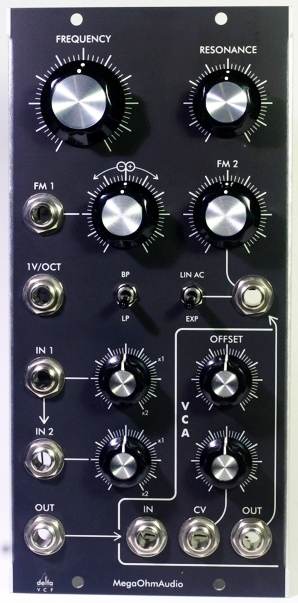
I'll take a look here at two of the most recent entrants. The first of the new contenders is Megaohm Audio, and first up is their Delta VCF. Megaohm advertises this as being a new design and not a clone of an existing filter, which is certainly welcome -- I think the synth world has just about all of the Moog-ladder clones it needs. From the block diagram and the board layout, it appears that this is a 4-pole OTA-based design. Also on board is an auxiliary VCA, going along with a recent trend to include VCAs on modules whose primary function is something else. It often seems as if modulars never have enough VCAs when doing complex routing, so I don't think anyone will complain.


Delta VCA -- photo from Megaohm Audio's Web site

The module is packaged in a 2U width Dotcom format. The panel layout is attractive and fairly well organized, if somewhat busy. The filter has a two-input mixer for audio in, and the input level controls, instead of the usual setup of unity gain at full clockwise, have unity gain at the 2 o'clock position and full CW is a gain of 2. That can be a useful feature when you are doing severe filtering and you are having problems with low output level, or if you want to overdrive the filter. The FM 1 input jack has an attenuator that can select inverted or non-inverted input. The FM 2 input is designed expressly for audio frequency modulation of the cutoff; it is AC coupled and switchable for linear response. The filter also has a 1 V/octave output; the manual notes that it is calibrated over about four octaves.

There's an interesting normalling loop. The filter's output is normalled to the VCA input. The VCA's output, in turn, is normalled to the FM 2 input. This means that if you feed the VCA a control voltage, and nothing is plugged into the normalled jacks, the filter's output is fed back to the FM 2 input. You can of course use the VCA for other purposes, although the normalling creates the oddity that if you are doing so, and you aren't using the FM 2 input, you need to insert a dummy plug into the FM 2 jack.

The filter is switchable between lowpass and bandpass response. There is no voltage control over resonance. However, you could use the VCA to create it: patch the VCA's output back into one of the filter inputs, and then apply control voltage to the filter to control the feedback.

It appears that quite a few large-format users are building Frankensynths these days, accommodating more than one format. Accordingly, you find a variety of power distribution schemes. Megaohm realized this and provides both Dotcom-style and MOTM-style power connectors. Very perceptive on their part! They ship the module with a cable that connects to a Dotcom octopus cable, but for a few bucks extra, they will provide a cable that connects to a MOTM 4-pin power distribution board.

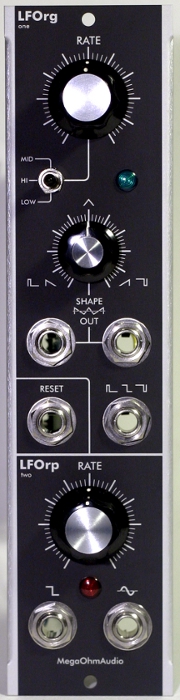
The other module Megaohm is currently offering is the LFO Two. This is a slightly odd combination of two dissimilar LFOs in a 1U-width Dotcom format module. Like the Delta VCF, it has both Dotcom and MOTM power connectors.


LFO Two -- photo from Megaohm Audio's Web site

The top LFO is based on a Korg MS20 design. It outputs square/pulse and triangle/ramp signals, through separate jacks (there are actually two jacks for the tri/ramp output). A shape control affects both the pulse width of the pulse output, and the shift between up ramp, triange, and down ramp on the tri/ramp outputs. Shape is not voltage controllable. This LFO is designed to run slowly; in the "hi" position of the three-range switch, range is from "just below audio" (presumably around 20 Hz) to one cycle every 30 seconds. There isn't much apparent difference between the "medium" and "low" range positions; both provide maximum cycle times of a few minutes.

The top LFO is hard-syncable via a reset jack. The bottom LFO can also be synced to this jack, if a circuit board jumper is moved; more about this in a moment. The bottom LFO is said to be based of that of the ARP Odyssey. Its outputs are square and, oddly, sine -- no triangle or ramp. There is no shape or pulse width control for this LFO.

An interesting feature of the LFO Two is the extensive set of options controlled by moveable jumpers on the circuit board. By moving them, one can, for example, select the peak-to-peak output voltages, what phase the top LFO advances to on reset, and whether or not the bottom LFO responds to reset. One useful option makes the pulse output of the top LFO a positive-going-only signal, which is what you want when you are using it as a trigger, gate, or clock. There's also a range selection for the bottom LFO. It would be a fairly simple matter to DIY an auxiliary panel and patch many of these options out.

The other recent arrival on the large-format scene that I want to discuss is Grove Audio. This is a company that has been known in the pro audio area for a while, but they are now taking the plunge into modular synthesis. Their two current offerings are the GMS-782 Dual LFO/VCA and the GMS-725 four-channel mixer. Both are packaged as 2U width Dotcom format modules.


GMS-782 -- photo from Grove Audio's Web site

The GMS-782 has two halves, each consisting of an LFO and a VCA. Both halves are identical. The panel layout is visually pretty clean, considering how much is going on. The LFOs are voltage controllable, and have sine, square, and triangle outputs on separate jacks. There is a high range and a low range; with the switch in high, frequency range is from 100 Hz to about one cycle per minute. The low range divides the rate setting by 10, which didn't seem that useful until I thought about it some; that's a low end of about one cycle per 10 minutes! And on the high end, I admit to having a preference for LFOs that can go at least a little ways into the audio range; I like to use these to drive VCAs for AM effects. However, there is no pulse width or shape control; hence no ramps. Each half has a trigger (reset) jack for hard sync.

The VCAs can be used to have voltage control over the level of the LFO output. Each LFO has its output wired into a VCA; a three-position rotary switch selects which waveform is fed to the VCA. The problem here is that the VCA input is not patchable, so the VCA is not usable for other purposes, which decreases the utility of this module some. The rotary switch takes up a lot of room on the panel, and if I were DIY hacking this, I'd take it out, put in a normalled VCA input jack, and put in a three-position toggle switch for selecting the waveform normalled to the VCA input.

The other Grove Audio module is the GMS-725 mixer. This is pretty straightforward; it contains a four-input mixer with each input having its own attenuator.


GMS-725 -- photo from Grove Audio's Web site

The nice thing here is that there is also a master gain control. Also, there is a DC offset control that can add or subtract up to 5 volts to/from the output. And there are inverted and non-inverted output jacks. Very neat. Further, there is a separate attenuator with its own input and output, and its own DC offset control. This looks very useful as a control voltage adder/mixer, and the default configuration comes with linear pots on the attenuators for that purpose, although you can optionally order it with audio-taper pots.

It's good to see new manufacturers entering the large-format arena with fresh ideas. It will be even better if these fresh ideas can be implemented while maintaining the quality standards that have become expected in the large-format community. These appear to be a good start.

Sunday, March 28, 2010

Q106 Calibration

While doing the tests and experiments for the MOTM-650 posts, I noticed that one of my Synthesizers.com Q106 VCOs was not scaling properly; high notes were playing sharp. This particular Q106 was one of my first modules; I've had it for five years and it hasn't been calibrated since it left the factory, so it was due. I have a second Q016 and I have calibrated that one (I bought that one used), so I know it can be a bit of a contest of wills, like most VCO calibrations are.

The Q016 has three adjustments, as pictured in the photo below:


The three blue pots right of center are the three basic tuning and scaling adjustments. The four at the upper left are associated with the Q106-CRS calibrated range switch; they allow you to trim scaling for each range (except the 2' and LFO ranges). The three pots at the right, from top to bottom, are the coarse tuning, scaling, and high-frequency compensation.

Dotcom's suggested calibration procedure has never worked for me, for some reason. Their procedure starts with setting the coarse tuning at C0 (32 Hz), going up one octave and adjusting the scaling there, and then going to high C and setting the high frequency compensation there. I always wind up in an endless loop of tuning the low C and then adjusting the scaling, and after I get done with that, it's still not in scale in higher octaves. Here's what I do instead:

  1. Set the range switch to 32' and center the frequency knob.
  2. Center the high frequency compensation pot.
  3. Center the 32' pot on the CRS. (If you don't have a CRS, you can skip this step.)
  4. Tune middle C, turning the coarse tune trimpot until it's in tune. If I hit the limits of the trim pot, I give the high frequency compensation pot about 1/4 turn clockwise.
  5. Check low C, adjusting the scaling pot until it's in tune. If I hit the limit of the scale pot, I adjust the 32' pot on the CRS until I have some more leeway on the scale pot.
  6. Re-check middle C and repeat steps 3 & 4 if necessary.
  7. Check high C. If necessary, adjust the high frequency compensation pot and go back to step 4.
  8. If you don't have a CRS, you're done. If you do, set the range switch to 16', play middle C, and adjust the CRS 16' pot until it is in tune.
  9. Repeat for 8' and 4'. I'm not usually able to get 4' to be exactly in tune; it usually winds up a bit sharp. I don't mind because I rarely use the 4' or 2' settings.

Sunday, March 21, 2010

Still More on the MOTM-650 -- Arpeggiators

I've now had some time to play with the arpeggiator functions on the MOTM-650, and here's what I have found out so far. First, in answer to a question I saw posted elsewhere: where is the MOTM-650 manual on Synth Tech's Web site? There doesn't seem to be a link to it from the 650's page, but the manual and menu navigation charts are here (PDF). However: the manual is unfinished, and none of the stuff that I'm about to cover is in it. So keep reading.

We discussed in the last installment how the 650 contains software constructs called "voice groups" which have physical output channels assigned to them. The arpeggiators are also software constructs. There are two of them, and each can be assigned to a voice group, or turned off. The arpeggiator can be thought of as a mischievous little sprite that looks inside the voice group to see what notes it has received, and then it arranges those notes into arpeggiations which it compels the voice group to play. When an arpeggiator is assigned to a voice group, it takes control of that group and arpeggiates all notes that that group receives. It is quite possible to assign an arpeggiator to one group and have it outputtting arpeggiations, while other voice groups continue to respond normally to incoming notes.

The arpeggiators get their clock source from the source selected in the global parameters. I'm going to write this tutorial-style, using a setup of the 650 and a modular that I described in the previous installment, so if you want to play along, go back and read that and set up your modular as described there.

Arpeggiator Clocking

Two parameters in the global options control how the arpeggiators are clocked. Press ESC as many times as you need to in order to get back to the top level screen. Then press ENTER and you will see:

Global
Options

Press ENTER to go into the global options. Then press INC as many times as needed until you see:

Clock
Internal (or something else)

This parameter selects the clock source for both of the arpeggiators. The available choices are:
  1. Internal. This selects a clock source that is built into the 650.
  2. MIDI Clk. In this mode, the 650 expects to receive MIDI Clock messages, which would typically come from a sequencer or DAW connected to the 650's MIDI In.
  3. Ext. Reg. This mode accepts a clock signal through the EXT CLK jack on the panel.
  4. Ext. Irr. This acts like the above, except that it appears to apply some sort of anti-noise algorithm to the clock signal. I'll explain what I found out about this further down.
For purposes of this tutorial, for right now we want it on Internal. So if it isn't, press ENTER, then INC/DEC until it says Internal, then ENTER again. Now, press INC to move to the next parameter, which is the beats per minute (BPM) setting for the internal clock. (If the clock source isn't set to Internal, you can't access this parameter.) You will see:

IClk BPM
100.0 (or some other value)

Press ENTER, and then use the INC/DEC buttons to select the value you want. If you hold a button down, the value advances rapidly. The allowable range is from 60 to 238 BPM. The bit that is a bit strange is the resolution (step size) by which you can raise or lower the value, because it depends on what BPM range you are currently in. Here's a handy table:

Range Step Size
60.0 -- 90.0 2.0
90.0 -- 105.0 1.0
105.0 -- 135.0 0.5
135.0 -- 150.0 1.0
150.0 -- 238.0 4.0

The highest resolution steps are concentrated in the range that is typical of club dance music. If you're more interested in doing, say, ambient/space rock, or ballroom music, these might be a bit fast. However, there's a way around that, which I'll get to in a minute.

At this point, if you have entered the value you want (i.e., the parameter isn't flashing), you can press INC and see the other clock-associated parameter:

MIDI Clk
Off (or Transmit)

In any clock source mode except the MIDI Clk mode, this parameter is available. It tells the 650 whether or not to transmit MIDI Clock on its MIDI OUT jack. This is an incredibly useful function -- consider: if you set the 650 to an external clock mode and then drive it with an LFO, you can use the MIDI Out to sync your drum machine to the LFO. If you have a voltage controlled LFO, you can drive the tempo of your whole song with a control voltage!

Assigning and Activating an Arpeggiator

Now let's go look at the parameters of the arpeggiators themselves. Press ESC until you get out to the top level screen, then press ENTER. Now press INC until you see:

Arpgtr 1
Settings

This is where, among other things, you assign the arpeggiator to a voice group. In fact, let's do that now. Press ENTER and you will see:

A1Assign
Off (probably)

Press ENTER, INC, ENTER. It will now say:

A1Assign
VoxGrp1

As of now the arpeggiator is active. If you left the MIDI clock source on Internal back in the global settings, the yellow BEAT LED will now be flashing at the tempo you set in the IClk BPM screen. This is the 650's way of telling you that you have an arpeggiator assigned to a voice group and the clock source is active. (If you left the clock source on MIDK Clk, you won't see the light flash until the 650 starts receiving MIDI Clock messages. Most sequencers and DAWs don't send MIDI Clock when they are stopped. If you left it on one of the external clock settings, it won't start flashing until you connect a clock source to the EXT CLK jack.) For now, go back and set it to Internal if you left it on something else, then come back to this screen. At this point, if you play some chords, you should hear the arpeggiator working!

Now press INC and you will see the next parameter:

Arp1Mode
Normal (or something else)

Press INC again and you will see:

A1 Order
Up (or something else)

These two parameters together determine in what order the notes will be arpeggiated. If the mode is Normal, then the Order parameter determines in what order the notes will be sounded:
  • Up: Notes are sounded from lowest to highest.
  • Down: Notes are sounded from highest to lowest.
  • Up/Down: Notes are sounded from lowest to highest, then back in the other direction. Note when counting beats that the bottom and top notes are sounded only once each in the progression, while the in-between notes are sounded twice.
  • Down/Up: Like above except starts with the highest note, going down.
The other three Arp1Mode settings behave independently of the Order parameter, and are as follows:
  1. Ordered sequences the notes in the order in which they are pressed.
  2. PingPong is kind of hard to describe. Basically, it takes the notes that are pressed, and divides them into "early" and "late" groups according to the order in which the notes are pressed. Then, it plays a note from the "early" group, a note from the "late" group, then the next note from the "early" group, and so on. The best way to hear this in action is to try this: play and hold three notes with your left hand, at the bass end of the keyboard. Then play and hold three notes with your right hand, at the treble end. What you will hear is a sequence of alternating left-hand and right-hand notes.
  3. Random does what you expect: it plays the notes in random order. Note that this is a totally random choice for each note sounded, which means that the same note may be played twice or more in succession.
There's one more arpeggiator parmeter, and this plays into the clock selection, as we mentioned a while ago. Press INC until you see:

A1 ClkDv
X1 (or something else)

This allows you to set a factor that multiplies or divides the clock rate, for this arpeggiator. The setting X1 makes the arpeggiator play at the clock rate. The settings X1.5, X2 and X4 make the arpeggiator play faster than the clock rate, by the factor indicated. The settings /4, /3, /2, and /1.5 make the arpeggiator play slower than the clock rate, by the factor indicated.

Using the Arpeggiators and Stress Testing

With my 650 configured in the 2/2 voice grouping mode, I assigned arpeggiator 1 to voice group 1, which gave me arpeggiation acting on output channels 1 & 2. I did a lot of playing around with the various modes and parameters and observed how the arpeggiator performs. With the clock source set to Internal in the global settings, I played some chords. As I did this, I went through the different output channel allocation settings in the voice group. Concerning that, here's what I found out about how the how the output channel allocation effects the arpeggiations:
  • When the allocation mode is set to Solo, all notes output by the arpeggiator are output on the first output channel assigned to the group; any other channels owned by the group are not used.
  • When the allocation mode is set to Solo Uni, all of the output channels assigned to the voice group play the arpeggiation in unison.
  • Setting the allocation to Solo Rot is the most interesting mode. In this mode, the arpeggiator outputs successive notes on different output channels. For example, in the 2/2 voice group mode, with the arpeggiator assigned to voice group 1, the first note of the arpeggiation is output by output channel 1. The second note is on output channel 2, the third note is on channel 1, etc. In the four channel voice group mode, where voice group 1 owns all four output channels, the first note goes out of channel 1, the second note out of channel 2, the third out of channel 3, the fourth out of channel 4, and the fifth out of channel 1. And so on.
  • The poly 1 modes act like Solo Rot. The poly 2 modes act like Solo. The unison modes act like Solo Uni.
This held true for all settings of the Arp1Mode parameter. I got some really unique effects using a 2/2 voice group setup with an arpeggiator on voice group 1, and each of the two output channels patched into a different string of the modular with different timbres, and the voice group's allocation mode set to Solo Rot. With this setup, if you play a chord with an odd number of notes, the notes swap back and forth betw een the two "voices" every other time through. It can create some very complex-sounding sequences with little effort.

There are a couple of "funnies" about the way that the arpeggiator handles notes being added or removed while a chord is arpeggiating. I haven't yet worked my way through all of the combinations, but one thing I noticed with an Arp1Mode setting of Normal and an A1 Order setting of Up: if you are adding or removing a note from the middle of the chord while the arpeggiator is running, you need to do it between the first now (lowest note) in the sequence, and when the arpeggiator gets to where the notes are being added or removed. If you press a note after the arpeggiator has "passed" that note, it will make a higher note in the sequence be double-triggered that time through. Similarly, if you let up a note after the sequence has "passed" it, it may make a higher note be skipped. It almost seems like at some point during the sequence the software is taking a count of the number of notes being held, and it will play that many notes regardless of how many are being held. However, with a bit of practice, you will get the feel of how and where in the sequence to change your chords without getting skipped or doubled notes; I was able to do it pretty consistently at a 120 BPM tempo after a few minutes of playing with it. I'm not sure if I'd consider this a software bug or not -- you just have to learn how to work with it, and if I were spec'ing out the software, I'm not sure what I would have it do differently.

I wanted to see how fast the arpeggiator could actually play, so I set the internal clock to its maximum rate of 238 BPM, and then I set the A1 ClkDv to X4, giving a note rate of 952 notes/minute, or about 16 notes per second. That seemed to work, although I couldn't swear that the sequence was actually sounding every single note; it was just too fast to hear. At some point I'll have to get the scope out and make sure that I'm seeing all of the pitch CV changes and gates -- I think the gate rate was too fast for any of the envelope generators I have in my modular, as it all kind of ran together even with all of the EG knobs on zero. At one point I pressed my sustain pedal (the 650 recognizes MIDI Sustain Pedal and does what you expect it to do) and glissed the whole keyboard, 49 notes. It seemed to be playing every note, and no notes remained hung when I let the sustain pedal up.

The MIDI Clock mode worked and it behaved like I expected it to. I was able to send it MIDI Clock from my DAW (once I found the clock routing parameters in MOTU Clockworks that I'd forgotten about, so that my MIDI Express would actually route it), and the arpeggiator followed tempo changes flawlessly. There is a setting in the voice group parameters which will provide a clock out signal from the aux jack when the clock source is internal or MIDI Clock, which I have not tried yet. At one point when I was trying to sort out the interrelationship between Metro (my DAW software) clocking parameters and the MIDI Express, I somehow managed to get a stuck note in the arpeggiator. Pressing the PANIC button on the MIDI Express, which sends All Notes Off to all outputs, failed to quiet it. However, starting and stopping Metro playback for a moment cleared it. I know that Metro sends a series of MIDI messages intended to quiet stuck notes when it starts and stops. I'll have to look it with an analyzer and see what's different about it that makes it work when just sending All Notes Off doesn't work.

I put the 650 in the Ext. Reg clock mode and took a pulse output from an LFO and put that into the EXT CLK jack. I was able to adjust the LFO rate and the 650's arpeggiation followed the LFO very nicely. I then set the clock mode to Ext. Irr. With the LFO as a clock source, I didn't notice any difference -- it seemed to track the clock exactly the same. I guessed that this mode perhaps was intended to apply some kind of smoothing to the clock rate, so in an effort to see the difference, I connected a white noise source to the EXT CLK jack.

Big mistake! The 650 went nuts; the screen became garbled and the LCD backlight flashed on and off irregularly. I disconnected that, and after pondering it for a moment, I connected the noise source to a lag processor and then connected that to the 650. While I was in the process of checking this out, the 650 stopped responding, and then a few seconds later I got the infamous "HOSED Q2" message. I cycled power and the 650 came back, with all the parameters set as before. So, I re-connected the output of the lag processor, with the slew rate turned all the way up (slowest). As I expected, the 650 saw no clock signal at this setting. So I gradually turned the rate down (faster) until the arpeggiator started triggering.

Here's where I saw a difference between Ext. Reg and Ext. Irr. With the Ext. Reg mode, as I turned the knob on the lag processor down, at a setting of about 3, the arpeggiator started triggering notes at random intervals, which was what I expected. However, when I switched to Ext. Irr mode, it stopped, and I had to turn the slew rate knob on the lag processor down to about 1 before I saw any action. Once it did start triggering, it looked about the same as in the other mode with the same slew rate setting. So I think my initial guess about what the Ext. Irr mode does was wrong. It doesn't average the clock rate. Instead, it appears to be a function that tries to clean up "ratty" clock signals. My guess is that it routes the clock through something like a Schmitt trigger.

There's been a lot of complaints from certain corners of the Internet about firmware bugs in the 650. So far from my experiments with it, I can say that a lot of the rumors are unfounded. Except for the two incidents described above -- both of which were cases where I presented "abnormal" inputs to the unit -- the 650's firmware performed as designed. Why did it crash when I routed the white noise to the EXT CLK jack? I'm not sure, but my guess is that the 650's CPU handles external clock input using the "interrupt" capability built into the CPU (that would be one way of assuring minimum latency in responding to the clock signal). White noise is broad-spectrum; my guess is that the white output of the source I used (MOTM-101 sample and hold) goes up to at least 15 KHz, which is a heck of a lot faster than anything you'd ever want to use as an arpeggiator clock. I ran into a problem on a work project, some time ago, where a small CPU like the one in the 650 was getting bombarded with interrupt signals at a far higher rate than it was intended to handle. Because the firmware was unable to dispatch the interrupts as fast as they came in, eventually it ran into a condition called "stack overflow" which caused a crash. My guess is that the 650 had something similar happen to it. I wonder: is the interrupt for that EXT CLK jack enabled all the time? And if so, does the jack normal to ground when there's nothing plugged in? Possibly, in dry weather, the jack picks up static or RF from the air. Here in Alabama, it's pretty humid most of the time, so we don't have too many problems with static or corona discharge. I should get out a function generator and see how fast I can clock it before it crashes. Sounds like a science project for next week.

As for "normal" use of the 650, though, I've already noted a number of interesting possibilities just going through the experiments that I used to compose these articles. Yes, it's definitely a keeper, and it's going to be used in my setup a lot.

Friday, March 19, 2010

More on the MOTM-650 -- Channels and Voice Groups

So now that I've had a bit of time to play with it, here is some more information on the MOTM-650 MIDI interface. In this post, I'm going to concentrate mostly on how the the voice groups work and how MIDI note information is routed to the output jacks. In my next post, I'll cover the arpeggiator functions.

Output Channels and Voice Groups


The first thing I had to understand about the 650 is the difference between the four physical output channels and the voice groups. Notice that the 650 has four columns of jacks; each column is an output channel. (The MOTM documentation refers to these as "voices", but I think that's a bit misleading, since the 650 produces no audio output by itself. I'm going to continue referring to them as "output channels" even though that's a bit wordy. And yes, to avoid confusing these with MIDI channels, if I mean "MIDI channel", I'll spell that out.) Each output channel contains (from bottom to top) a pitch CV jack, a gate jack, a velocity CV jack, and an aux CV jack. (The EXT CLOCK jack at the upper right doesn't go with any output channel; it's an independent entity. More about it in the next installment.) Each output channel also has a red LED underneath the LCD display that lights up when that output channel's gate is in the "on" or "high" state; these are labeled V1 through V4 on the panel.

The voice group, on the other hand, is a software construct. Each voice group "owns" one or more output channels, depending on how many voice groups the 650 is configured to use. Each voice group listens to incoming MIDI data on one MIDI channel (which is configurable in the voice group's parameters). When the 650 receives MIDI note messages, it directs the MIDI events to a voice group according to what MIDI channel the data came in on. The voice group then transforms the MIDI note information into control voltage and gate signals, and directs these to be output on one or more of the output channels it owns. This is done according to the allocation mode, which is also a voice group parameter. The neat thing is that if the voice group owns more than one output channel, it can operate them polyphonically or in unison, depending on the chosen allocation mode.

Global Modes

To sort all this out, we need to being by introducing the 650's global mode settings. If you are at the 650 and you haven't pressed any of the buttons, the 650 LCD screen will be at its top-level display. (If you've been messing with it, press the ESC button 4 or 5 times, until the display quits changing.) The display will look something like what is pictured below. (In this article, I will show text that you should see on the 650's screen in bold.)

G1 CH=1
Solo


This summary display shows you the basic status of the voice groups. The above shows that you are looking at voice group 1, and it is set to MIDI channel 1 and is in SOLO mode. More on that in a minute. First, let's go through the global settings. Press ENTER and you will see:

Global Options

Press ENTER again and you will see something like:

VGrpType
1/1/1/1


This lets you select the division of output channels into voice groups. We'll come back to this in a minute. At this point, pressing INC or DEC will scroll through the available global parameters. I'll save a complete recap of the global parameters for the end of this post. For right now, there are two things you may want to change; one is the backlight setting. Press INC or DEC until you see something like:

Backlight
Auto


On this setting, the backlight comes on whenever you press a panel button, and goes off 5 seconds later. You generally want to keep the backlight off as much as possible because it draws a lot of current from your modular's power supply. But for right now, you may find the auto backlight annoying. Press ENTER, and the bottom line of the display will begin flashing. This indicates that you can now use the INC and DEC buttons to change the value. You can change the setting to OFF, AUTO, DIM, MED, or BRIGHT, and as you change it, you will immediately see the change. Press ENTER again to store the change, or ESC if you decide you really didn't want to change it after all. (This will be the case for all of the parameter-changing screens.) Either way, the bottom line of the display will stop flashing, indicating that you are no longer in the parameter change mode.

Now, press INC some more until you see:

Priority
LastNote
(or something else)

The three possible values are Last Note, Low Note, and High Note. Most of the time you will want this on Last Note -- I'll explain why in a bit. If it's not on Last Note now, press ENTER so that it flashes, and then use INC/DEC until it says Last Note, and then press ENTER to lock that in.

At this point, pressing INC/DEC will show other global parameters. Pressing ESC will take you back to Global Options, and pressing ESC again from there will take you back to the top level screen.

Go to the Global Options again and press ENTER. You will be at the VGrpType screen. Here you will select the number of voice groups and how they will divide up the four output channels. The 650 can be configured to have (text in brackets shows what the second line of the display shows):
  • One voice group which uses all four output channels [4].
  • Two voice groups, each of which uses two output channels [2/2]. In this mode, voice group 1 uses the two leftmost output channels, and voice group 2 uses the two right most.
  • Four voice groups, each of which uses one output channel, counting from left to right [1/1/1/1].
For the purpose of following this discussion, use INC and DEC until 2/2 is shown, and then press ENTER to lock it in.

Voice Group Parameters

Each voice group has a set of parameters that tell it how to interpret MIDI data, and what to do when the voice group receives more MIDI notes than it has output channels available. To get to the settings for each voice group, press ESC as many times as you need to to get back to the top level screen. Now, press ENTER and then INC, and you will see

Voxgrp1
Settings


You are now in the parameter settings for voice group 1. Let's step through these parameters. Press ENTER and you will see:

VG1 MIDI
Chan=1

This says that voice group 1 expects to receive MIDI data on channel 1. Presuming that you have either a MIDI controller or a computer with a MIDI interface connected to the 650, check which MIDI channel your controller/computer is transmitting on. If it isn't channel 1, go through your steps for changing a parameter's value on the 650: press ENTER (bottom line of screen starts to flash), use INC/DEC to change the value, and then ENTER again to lock it in. Press INC again to see something like:

VG1 Allo
Solo
(may be a different word)

This is the poly mode / output channel allocation selection. We'll come back to this one. Press INC again, and you will see:

VG1Glide
Off


This is your glide, or portamento setting. When on, it causes pitch control voltages output by this voice group to move smoothly between note values. There are constant-time and constant-rate settings. The constant-time setting can, incredibly, be set in millseconds from 1 ms to 65.536 seconds. The constant-rate setting is in arbitrary values from 1 to 127. Experimentally, setting 127 results in portamento that moves at about one octave in 100 ms; a setting of 1 causes it to take around 22 seconds to transition one octave. Leave this alone for the time being and press INC again, and you will see:

VG1 PBend
2 (or some other value)

This sets the pitch bend response in semitones. When the voice group receives MIDI pitch wheel messages, it will increase or decrease the pitch CVs being output according to the pitch bend. (You can also get the isolated pitch bend voltage as a separate output signal from an aux jack.) This parameter sets how much the full-scale bend is, in semitones. Allowed values range from 0 (no bend) to 24 (two octaves in either direction). If you want to change it, press ENTER, use the INC/DEC buttons to change the value, and then press ENTER again. Now press INC to see:

VG1GType
Normal


This parameter allows you to change the function of the gate jacks in the output channels assigned to this voice group. The available setting other than Normal is S-Trig. This is a requirement for interfacing to some old Moog gear; if you have any such, you probably already know about S-triggers. Otherwise, leave this parameter alone.

The next screen is:

VG1 V/T
Velocity


The Velocity jack in an output channel normally outputs a control voltage that represents the MIDI velocity of the note being played. This parameter allows you to change the jack's function to output a trigger instead. I'm sure this has a purpose, but I'm not sure what. Leave it alone and go to the next screen:

VG1 Aux
CC1 ModW
(or something else)

This allows you to select what signal will be output by the Aux jacks. The available choices are Velocity (outputs the MIDI velocity), PitchBnd (outputs the pitch wheel value independent of the pitch CV), ChAftTch (aftertouch), ClkPulse (will be covered later), Disabled, or any MIDI Continuous Contoller (CC) from 0 to 31. Use the ENTER and INC/DEC buttons if you want to change it. Then press INC to go to the next screen:

VG1AUXSc
4 Volts

This sets the scaling for the aux jack; it will output the indicated voltage when the selected control signal is at its maximum value. It can be set to 1, 2, 4, or 8 volts. Depending on what you have the signal coming out of the aux jack routed to, it can be handy to be able to change this, but most of the time you will probably want to leave it on 4 volts.

Voice Group Allocation Modes

Now, press INC several more times until you cycle back around to the output channel allocation parameter:

VG1 Allo
Solo
(may be a different word)

The most complex aspect of the voice groups is the output channel allocation, and they interact with the allocation modes. The complexity comes in when the "4" or "2/2" voice group mode is selected in the global parameters, so that the voice group owns more than one output channel -- what does the group do with each of the outputs? It's somewhat like the process of allocating voices on a polyphonic synth.

To illustrate the modes, we will now do a little tutorial. If you have sufficient resources in your modular, patch up a little "two-voice" demonstration patch. You'll need two VCOs, two EGs, two VCAs, and a mixer. Note that filters aren't necessary for this purpose; you just want to be able to hear notes play. Now patch it up like this:
  1. The first output channel on the 650 has its pitch CV patched into VCO #1. The gate is patched into EG #1, and the VCO and EG outputs are patched into the signal and control inputs of VCA #1, respectively.
  2. The first output channel on the 650 has its pitch CV patched into VCO #2. The gate is patched into EG #2, and the VCO and EG outputs are patched into the signal and control inputs of VCA #3, respectively.
  3. The signal outputs of VCAs #1 and #2 both feed into a mixer.
If, back when we discussed the global settings, you set the voice group mode to 2/2, you are now good to go. Otherwise, press ESC until you get back to the main screen; press ENTER to get the global options screen, use INC to get to the VGrpType parameter, change it to 2/2, and lock that in. Now press ESC until you get back to the main screen, press ENTER to see the global options, press INC to get to the voice group 1 options, and press ENTER. Then, press INC until you see the VG1 Allo screen.

Press ENTER to change the parameter, and press INC or DEC until you see:

VG1 Allo
Solo


and then press ENTER to lock it in. This is the easiest of the alloction modes to understand. In this mode, the voice group plays in strictly monophonic fashion, and it only uses the first of whatever output channels are allocated to it. So as you play, you will see only the V1 light lighting. If you have set up the demonstration patch, you will only ever hear VCO1. Now, press ENTER, then INC twice, then ENTER again, and you will see:

VG1 Allo
Solo Uni


This mode will "play" all output channels allocated to the voice group in unison. So if the 650 were in the "4" voice group mode, you would see all four sets of CV/gate/velocity jacks will output the signals for that note, and you'll see this by way of all four of the red gate LEDs lighting up when you play the note and going out when you release it. As it is, if you are following along with this writeup and you have your 650 in the 2/2 voice group mode, the first two output channels will be active and the V1 and V2 LEDs will light when you press a note. If you have patched your modular as above, you will hear your two VCOs playing in unison (or whatever interval you have tuned them to).

What if you play more than one note in these mono modes? Remember that "Priority" parameter we looked at back in the global parameters? It determines what happens in this situation: it can be set to output either the highest note played, the lowest note played, or the last note played (that is, the note most recently pressed). If this note is subsequently released while other notes are still held, the 650 will again determine which note has priority and the pitch CV will jump to that note -- without the gate signal going off and back on. This is sometimes called "retriggering" and can be observed in many monophonic synths. If you have the gate signal patched conventionally into an envelope generator, the new note will play while the EG remains in its sustain phase, since the gate signal didn't cycle. One use of this is to simulate the "hammer" and "pulloff" techniques used by guitarists. The gate signal will not go low until all held notes are released. If you want to play with this, you can go back to the Global Options and change the Priority setting, but make sure you change it back to "Last Note" before proceeding.

Press ENTER, DEC, and ENTER again, and you will see the next mode:

VG1 Allo
Solo Rot


In the "Solo Rot" (rotation) mode, the voice group will not activate all of its output channels at once. Rather, the first note played will be output by the first available output channel. When another note is played, that note will be output by the next output channel, and so on. This is a sort-of-monophonic mode in that only one gate in the voice group will be active at a time. But. if you have set up the demonstration patch described above, turn the Release settings on both of your EGs to long values. Now play some notes. Can you hear two notes sounding at once in places? Here's what's happening: basically you have patched your modular as a simple two-voice polyphonic synth. Now, when you play a note, its pitch CV and gate will be output by output channel 1 on the 650, and you will hear the note played by VCO #1, EG #1, and VCA #1. Now you play a second note. This note will be output by the pitch CV and gate jacks of output channel 2 on the 650. The gate for output channel #1 will drop, since the 650 is still in a mono mode. However, with a long enough release time on EG #1, you will continue to hear the first note as it releases while the second note sounds. Note that the pitch of the first note remains the same -- the first output channel continues to hold the pitch CV of the previously played note, even though it has dropped its gate. It has to do so in order that the pitch of the note can still be heard during the release phase. The 650 doesn't know how the EG is set up (or anything else about how the modular is patched up), so it most hold the pitch CV until it needs that output channel for a new note. This is actually a fundamental principle of control of any analog synthesizer: the control interface, whatever type of mechanism it may be, must hold the pitch indication of the last played note even after the performer releases the note, since an arbitrary amount of time may elapse between note release and the note fading to inaudibility. Going back to our setup, when you play a third note, the rotation will return to the 650's first output channel. If the previous note is still sounding owing to a very long release time, the pitch will jump as the output channel outputs the pitch CV and gate for the new note.

And that leads us into the the polyphonic modes. Go press ENTER, INC, INC, ENTER, and you will see:

VG1 Allo
Poly1


Now play first an E and then an A. Since the E is the first note played, it will be output on output channel 1. The A will then be output by output channel 2. You will hear both notes being sounded. Now let up first the A and then the E, and then play an F. Which channel outputs the F? In poly 1 mode, it's the second channel. Why? Because in this mode, the 650 tries to allow for the longest release time possible for each released note before it re-uses the output channel. Since the A was released first, and it was being output by the second channel, the 650 chooses the second channel to play the F. If we let up the F and then play F#, the F# will be output by the first channel, since that channel hasn't been used since the E was released, and that was longer ago then when the F was released. In computer science terms, this is called least recently used. The advantage of least recently used mode is that it is least likely to "cut off" a note that hasn't yet faded into inaudibility. Of course, with only two channels allocated to the voice group, it isn't going to make much difference if you are playing fast. But if you had a four-note poly setup, and were in the mode where voice group 1 uses all four channels, it might make a difference. More to the point, you can control the output channel usage by how you release notes, which opens up possibilities like patching each output to patches of unlike timbre, and then using it to create patterns of notes that vary in both pitch and timbre.

NOTE: none of the poly modes will work right unless the Priority parameter in the Global Options is set to LastNote! The Low Note and High Note priority settings interact with the poly modes in an unfortunate way: if you are holding a key on the keyboard, the voice group will ignore any lower-value or higher-value notes that are played, depending on the Priority setting. If you have your 650 in a Poly mode and it seems to be "missing" notes, check the Priority setting.

Note that this poly 1 mode will not "steal" a note; that is, if you are already holding two notes and you press a third, the third note won't be heard because there is no output channel available for it. However, if you press ENTER, INC, and ENTER, you put the voice group's VC1 alloc into "Poly1 St" mode. Now the third note will steal an output channel from a note that is still being held.

Press ENTER, and then keep pressing INC until you see:

VG1 Allo
Poly2

and then press ENTER to lock it in. Poly 2 mode allocates output channels to notes according to which note was played first. As in our example above, if you hold E-A with the E being struck first, the E will be output on the first channel and the A on the second channel. If you then let up these two notes and play an F, the F will be output on the first channel. Letting up the F and playing F# will output the F# on the first channel, and so on. As long as you play only note at a time, that one note will be output on the first channel. Only when you play two notes will the second note you played be output on the second channel.

What good is this? Well, it's the bees' knees for polyphonic portamento. You can enable portamento (glide) mode for the voice group (go back to the discussion above about the voice group parameters) and portamento will be applied to each output channel as it transitions from one note to the next. In the Poly 2 mode, you have control over which output channel plays which note by slightly arpeggiating the notes you play; the first one you strike will be played by the first channel, and so on. This way, you can control the glides between individual notes in a chord and prevent them from "crossing" each other. (Or make them all cross if that's what you want to do.) As in the case of Poly 1 mode, Poly 2 is non-stealing, but there is a "Poly 2 St" mode which will steal.

Finally, we have the polyphonic unison modes. Press ENTER and then INC as many times as needed until the display reads:

VG1 Allo
Unison


This is a rather strange but interesting hybrid mode. Play one note, and both output channels allocated to the voice group will output the note in unison. However, if while holding that note, you play a second note, it takes away the second output channel, and then it behaves as if it were in Poly 2 mode. This continues until all notes are released, and then the next note will be played by both channels in unison. When the VGrpType is in "4" mode, it gets more complicated:
  • Play and hold a note, It gets all four output channels, in unison.
  • While holding that note, play and hold a second note. It will be output on output channels 3 and 4, while the first note retains output channels 1 and 2.
  • While holding those notes, play a third note. It will take output channel 2, and output channel 4 will mute (the gate will drop).
  • While holding those notes, play a fourth note. It will take output channel 4.
If that isn't all complicated enough, there is also a UnisonSt mode that will steal.

The Aux Jacks and MIDI Controller Data


Before we go, let's talk about the functions of the AUX output jacks some more. The aux jack can be made to respond to MIDI control signals coming from the MIDI channel that is assigned to the voice group. This operates independently from the note tracking and voice allocation; unless the group is set to output velocity on the aux jacks, all of the aux jacks in a voice group will output the same signal. This can be set to track pitch bend, velocity, aftertouch, or any MIDI continuous controller number in the range 0-31. (Mod wheel, a commonly used choice, is MIDI CC 1.) Another voice group parameter allows you to set the scaling of the aux jack.

Something worth mentioning is that in the "2/2" or "1/1/1/1" voice group modes, it is not a requirement that each voice group be set to a separate MIDI channel. If two or more groups are set to the same channel, they will all respond to that channel. One use of this is to be able to output multiple performance control parameters. For example, in "1/1/1/1" mode, you could set voice groups 1 and 2 to the same MIDI channel, but set the aux jack for voice group 1 to track aftertouch, and set the aux jack for voice group 2 to track CC 1 (mod wheel).

In a later post (hopefully within the next week), I'll cover the 650's arpeggiator functions.

Wednesday, March 17, 2010

New additions to the Discombobulator

Here are two new additions to the Discombobulator:


The above is the Synth Tech MOTM-650 four-channel MIDI interface. I haven't had a lot of chances to play with it yet, but it's pretty slick. Each channel converts a MIDI Note On/Off pair to a control voltage representing pitch, an envelope gate, a control voltage representing velocity, and a fourth output which can be associated with a MIDI control number. The pitch CV reacts and responds to MIDI pitch wheel messages also.

It basically has three operating modes. It can be configured as a monophonic interface, responding to MIDI Note On/Off messages and placing the same output signals on all four channels. It can be configured to be four-voice polyphonic on a single MIDI channel -- in this mode, each output channel pitch, gate, and velocity for up to four active notes on a selected MIDI channel. It can also have the output channels divided between four MIDI channels. I believe there are some combinations of the above, but I haven't had a chance to play with that yet. There are also significant MIDI clock conversion modes and a built-in arpeggiator function, none of which I have explored yet.

The arrival of this module means that I can now dedicate my JKJ CV-5 to controlling my EML 101. EML gear uses a different scaling standard for pitch control voltages, 1.2V/octave as opposed to the now-industry-standard 1V/octave. The CV-5 is one of the few MIDI interfaces that can be scaled to this standard. Now I don't have to mess with its calibration to move it back and forth between the 101 and the modular.

I'll have more info up on the MOTM-650 after I have had some time with this module.


The second new gem, pictured above, is the Encore Electronics UEG-01 Universal Event Generator. It's been out of production for several years, as Encore has switched its focus in module design to Frac format modules, but recently Encore solicited on Muff's to see if there was any new interest in the UEG. There was, so they are now doing a reissue, and this is a new unit from the current run.

So what is a universal event generator? It's an expansion and generalization of the concept of an envelope generator. We tend to think of a conventional ADSR envelope generator as having four phases, but it's really only three, and we only have full control over one of the three:
  1. For the attack phase, we only have control over the time that this phase takes. We do not have control over what level it ends at; it always ends at the maximum level that the enveloper generator is capable of generating.
  2. We have full control over only the decay phase. We have control over its time (the decay time) and over what level it ends at (the sustain level).
  3. The sustain really isn't a phase of ADSR envelope generating, when you think about it. That's because as far as the EG is concerned, there's nothing happening; it's simply waiting for the key gate to go low.
  4. We have control over the time of the release phase. We don't have control over what level it ends at; it always ends at the zero level.
A universal even generator gives you control over the time and ending level of every phase. (In theory; it's usually the case even with UEGs that the last phase always ends at the zero level. That's true of the Encore UEG too. The only envelope generator I've come across in a hardware synth that allows the last phase to end at a non-zero level is the pitch envelope on the Roland JD-800.) The Encore UEG has eight phases, each of which has a time control sweepable from a few milliseconds to about eight seconds. The first phase is actually somewhat faster when the time control is set to full CCW, so that it can produce a nice percussive attack spike. Each phase except the last also has a knob specifying what level that phase will end at.

So what can you do with these eight phases? This is an area where the Encore UEG really stands out. There are basically three operating modes that you can select with the pair of 3-position mode switches. Putting the top switch in the GATED position and the second switch in the RELEASE position selects a "conventional" envelope generation -- but with much more flexibility. In this mode, when the gate goes high, the UEG will begin executing with phase 1, going through the times and levels as set for each phase It will continue doing this until it reaches the phase that is selected by the LOOP END switch. After that phase ends, if the gate is still high, the UEG will jump back up to the phase selected by the LOOP START switch. The steps between the LOOP START and LOOP END selections therefore constitute a sustain loop, allowing periodic variation in level during the sustain phase, and therefore a more interesting sound if you're using the UEG's output to control volume or filter setting of a patch. When the gate finally goes low, the UEG will jump to the phase following the LOOP END selected phase, and from there it will execute the remaining phases until phase 8 completes.

You can see how this can produce much more powerful and interesting envelopes. Depending on the LOOP START and LOOP END selections, you can have up to 4 attack/decay phases preceding the sustain loop, and up to 3 release phases. Or you could have a sustain loop consisting of as many as 6 phases. A further variation can be introduced by placing the second-from-the-top mode switch in the FINISH LOOP position. In this position, when the gate drops, the UEG will complete the current iteration of the sustain loop before preceding to the release. (I noticed a peculiarity in this; if the gate drops when the sustain loop is in the phase selected as LOOP END, the loop will usually run one more time before the UEG proceeds past the loop.)

The UEG interpolates between the level settings of each phase to produce slopes in the output. How it does this can be selected by the SLOPE switch. There are three settings, two of which might be conventionally used in envelope generation. In the top setting, rise and fall is exponential -- it starts rapidly and slows down as the level setting is approached. This emulates the way that most analog envelope generators work. In the middle setting, rise and fall is linear, which may be more desirable when using the UEG's output as a pitch or filter cutoff modulation envelope.

In the bottom setting of the slope switch, the UEG jumps immediately to the level setting at the start of each phase, and holds that level for the time of that phase. That can make for some interesting envelope generation, but it's intended primarily for use with the UEG's sequencer modes. Yes, the UEG can be used as a (pseudo-) analog sequencer! There are two ways of going about this. With the top mode switch still in GATED, if the second switch is set to STEP, then the UEG will advance one phase every time the gate goes from low to high. In this mode, you can input a clock signal (say from an LFO) into the GATE jack, and the UEG will act like a conventional 8-step sequencer. You set the output values with the LEVEL controls for phases 1-7; in order that step 8 doesn't have to end with zero level, in this mode only, its TIME knob becomes a level control instead. The loop switches and the phase 1-7 time knobs are ignored in this mode.

Setting the upper mode switch to LOOP ONLY turns the UEG into a self-clocking sequencer consisting of 2-6 steps, as selected by the loop start and end switches. In this mode, the selected loop runs continuously (the GATE input is ignored). The time controls are active, so that each step can occupy a different amount of time. There is no way to sync the UEG to an external clock in this mode, so instead there is a provision for the UEG to be the sync source: at the start of each loop, it will output a short trigger pulse from the TRIG OUT jack, which you can slave other modules and functions to. The rate will obviously depend on the sum of the time settings within the loop.

Finally, the UEG can be used to generate staircases or other complex waveforms by placing the upper mode switch in the ONE SHOT position. In this mode, each time the gate goes high, the UEG proceeds through all eight steps one time (the loop switches are ignored). All time and level controls are active. A trick you can use here is to trigger it with an LFO so that it generates a repeating complex waveform. You can effect the shape of the waveform with the SLOPE switch.

The TCV jack accepts a control voltage which scales up all of the time settings at the input voltage goes up. The UEG manual notes that the absolute maximum time for any stage is 8.3 seconds, so as the TCV voltage goes up, longer steps will be limited to this max time while shorter ones continue to get longer. That's a limitation, but it could also be useful. A handy manual gate button completes the panel. I've noted that the manual gate button double-hits occasionally; the manual does note that it is not debounced and is not meant as a performance control.

Both the MOTM-650 and the UEG-01 are valuable additions, although obviously much different in purpose. However, I'll note one thing they have in common: they are both microprocessor-controlled modules. There are people who will object to this, but I think that MIDI control is the gateway to (among other things) getting away from the "keyboard paradigm" of modular synth control. And the complexity of the UEG would be near-impossible in analog circuitry. It's far past time that more digital functions started showing up in modular synthesis, and the Euro format manufacturers such as Harvestman and MakeNoise have gotten ahead of the 5U world in this area. So it's good to see some large format designers approaching (or in Encore's case, re-approaching) the 5U world with a fresh eye for digital methods. Incidentally, Encore is now soliciting interest at Muff's for a revival of the 5U version of its highly regarded digitally-controlled frequency shifter. If you at all interested, chime in on that.

Thursday, March 11, 2010

Painting


Screw heads, that is. I want the screw heads to match the finish of the modules in the Discombobulator. It's hard to find small wood screws that are painted. So I roll my own. The paint is gloss black modeling enamel. Unfortunately, it's quite humid here so they aren't going to be dry until tomorrow.


Meanwhile, it occurs to me that it's been quite a while since I update the module lineup of the Discombobulator. I've decided to name the four function blocks after moons of Saturn. I was going to use Jupiter moons at first, but Jovian names have already been used considerably in the synth world, including the very successful Jupiter and Juno synths from Roland. But as far as I know, Saturn names have barely been touched except for one unremarkable string synth from Roland in the early '80s (the SA-09 Saturn). So the four existing blocks are now named Titan, Dione, Rhea, and Iapetus. A fifth block, currently in the parts-ordering stage, will be named Tethys, which will cover the moons discovered by Huygens and Cassini (the astronomer, not the satellite). So here's the lineup of the three blocks in the room with me:

Titan (so named because it was the first moon of Saturn discovered, and the first function block I built:
  • Synthesizers.com Q141 oscillator aid
  • Synthesizers.com Q106 VCO
  • 1U open
  • Synthesis Technology MOTM-190 VCA
  • Synthesizers.com Q109 envelope generator
  • Synthesizers.com Q123 standards
  • 1/2U open
Dione:
  • Synthesizers.com Q130 clipper/rectifier
  • Synthesis Technology MOTM-410 triple resonant filter
  • Synthesis Technology MOTM-510 WaveWarper
  • Cynthia Synthacon VCF
  • Synthesis Technology MOTM-440 OTA VCF
  • Synthesis Technology MOTM-890 micro mixer
Rhea:
  • Synthesizers.com Q106 VCO
  • Synthesizers.com Q161 oscillator mixer
  • Synthesis Technology MOTM-320 VC LFO
  • Synthesis Technology MOTM-101 sample and hold
  • 1/2U open
  • Synthesis Technology MOTM-890 micro mixer
Iapetus is out on the workbench getting some new modules installed. Here's a pic of one of them:


Oh darn, the flash washed out the image. Guess you'll just have to wait until this weekend to find out what it is!